

.png?width=299&height=52&name=PSIT%20Blog%20Graphic%20Icons%20(1).png)
.png?width=299&height=52&name=PSIT%20Blog%20Graphic%20Icons%20(2).png)
.png?width=299&height=52&name=PSIT%20Blog%20Graphic%20Icons%20(3).png)
.png?width=299&height=52&name=PSIT%20Blog%20Graphic%20Icons%20(4).png)
Why Managed IT Services Aren't Complete Without Integrated Cybersecurity
Technology has quietly become the backbone of how modern work actually happens.
Email, cloud platforms, collaboration tools, security systems, customer databases, none of these are side systems anymore. They are the system.
When everything works, they disappear into the background. When they don’t, productivity slows, decisions stall, and attention shifts away from the work that actually matters.
What’s interesting is that many organizations still manage this backbone reactively. IT support enters the picture only after something breaks, slows down, or triggers an urgent internal message along the lines of “Is anyone else having this issue?”
That model, often called break-fix IT or reactive IT, wasn’t always a problem. But the environment has changed. Hybrid work, cloud dependency, and increasingly sophisticated cyber threats have quietly raised the stakes.
This is where the difference between reactive and proactive IT support starts to matter, not as a technical distinction, but as a business one.
Let’s break down what’s really at stake, and how shifting from break-fix to proactive IT support puts your business on a stronger footing. You’ll hear a real‑world example of this shift later in the post, including a first‑hand perspective from SureCall Contact Centers on why proactive IT became a cornerstone of their always‑on service model.
In this blog, we’ll explore:
🫣 The Hidden Cost of Reactive IT Support
🚨 Is Your Business Still Operating in Break-Fix IT Mode?
🤔 What “Proactive” IT Really Means
✅ What Proactive IT Is (and What It Isn’t)
💡 5 Key Benefits of a Proactive IT Partner
🧰 Transitioning from Break-Fix to Managed IT
🎥 Real-World Example: SureCall Contact Centers
🚀 Get Proactive with ProServeIT’s Managed IT Services
❓ Frequently Asked Questions (FAQs)
Break-fix IT sounds reasonable on the surface. You call for help when something breaks. You pay for what you use. No ongoing contracts, no monthly fees. It feels a bit like calling a plumber only when the kitchen floods, inconvenient, but straightforward.
The challenge is that the real costs don’t always appear where you expect them to. Break-fix or reactive IT often carry high hidden costs, like interest on a credit card you forgot you opened. These include:
📉
1. Downtime that halts productivity
When systems slow down or go offline, work doesn’t stop dramatically, it fragments. Tasks take longer. People wait for access. Small delays ripple across teams, turning simple work into a game of digital musical chairs.
Individually, these moments feel minor. Collectively, they add up to lost productivity, missed opportunities, and unnecessary stress — especially when customer-facing systems are involved.
📉📉
2. Security risks that slip through the cracks
Break-fix IT doesn't typically involve watching systems continuously. Updates get deferred. Older software sticks around longer than it should. Small vulnerabilities remain open simply because nothing appears “broken.”
From a cybersecurity perspective, those quiet gaps are often the most valuable ones. Attackers don’t look for alarms blaring, they look for unlocked side doors.
📉📉📉
3. Band-aid solutions instead of long-term fixes
When IT support is purely reactive, the goal is usually speed: restore access, get things running, move on. The focus is on triage, not prevention (stop the bleeding first, ask questions later).
That works in the moment. But without time to investigate root causes, the same issues tend to resurface — sometimes weeks later, sometimes months, often in slightly different forms.
📉📉📉📉
4. No strategy, just firefighting
Break-fix IT lives in the present tense. When something breaks, it gets fixed. When it doesn’t, attention shifts elsewhere. There’s no calm moment to zoom out, only the next alert.
That leaves little room to step back, and ask questions like:
-
Is this infrastructure still fit for how we work today?
-
Are we scaling safely?
-
Where are we exposed to unnecessary risk?
Without that perspective, technology decisions become reactive too. There’s no roadmap, no long-term planning, and no alignment between your technology and your business goals.
📉📉📉📉📉
5. Costs that spike at the worst possible times
Emergency work is almost always more expensive than scheduled maintenance. And because issues don’t arrive on a schedule, neither do the invoices. They tend to show up precisely when patience, and budgets, are already thin.
For growing organizations, that unpredictability can become harder to justify over time. Not because IT is expensive, but because surprise IT always is.
.png?width=1024&height=457&name=Hidden%20Cost%20of%20Reactive%20IT%20Blog%20(1).png)
Is Your Business Still Operating in Break-Fix IT Mode?
Most organizations don’t decide to run on break-fix IT.
It usually happens the same way clutter builds up in a garage: one quick workaround at a time. A temporary fix here. A postponed update there. Everything technically still works… until one day it really doesn’t.
You’re likely operating reactively if:
-
IT issues feel frequent, even if they’re not catastrophic
-
The same problems keep resurfacing like an uninvited guest who somehow always finds their way back
-
Updates and security patches are applied inconsistently
-
Security feels assumed rather than actively managed (more hope than certainty)
-
IT planning happens after an incident, not before
-
Technology decisions are driven by urgency, not strategy - whichever problem is loudest that day wins
None of this means your IT is broken.
It usually means it’s being run without margin. No buffer, no runway, no space to step back and ask, “Is this still the right setup for how we actually work now?”
That’s the gap proactive IT is designed to fill.
What “Proactive” IT Really Means
Proactive IT support isn’t about doing more IT work. It’s about doing the right work earlier.
Instead of waiting for something to fail, systems are monitored, maintained, and adjusted continuously... the same way you’d treat anything you depend on daily and cannot afford to have suddenly stop working.
In practical terms, proactive IT includes:
-
Systems are monitored 24x7
-
Updates and patches are applied before they turn into security risks
-
Security controls are actively maintained, not assumed
-
Potential issues are spotted early and handled quietly — often before anyone notices a thing
-
Technology decisions are made with business goals in mind, not emergency deadlines
The easiest way to think about it is that break-fix IT waits for the smoke alarm, whereas proactive IT fixes the wiring before anything starts smoldering.
Same environment. Very different outcomes.
If you want a deeper look at how strategic IT fits into business growth, this post breaks it down well:
👉 Why IT Strategy Matters: Aligning Technology with Business Goals
What Proactive IT Is (and What It Isn’t)
Proactive IT can sound vague, so let’s ground it.
Proactive IT is:
✅ Preventative care for your technology (maintenance beats emergency surgery)
✅ Continuous monitoring and upkeep
✅ Strategic guidance rooted in how your organization actually operates day to day
Proactive IT is not:
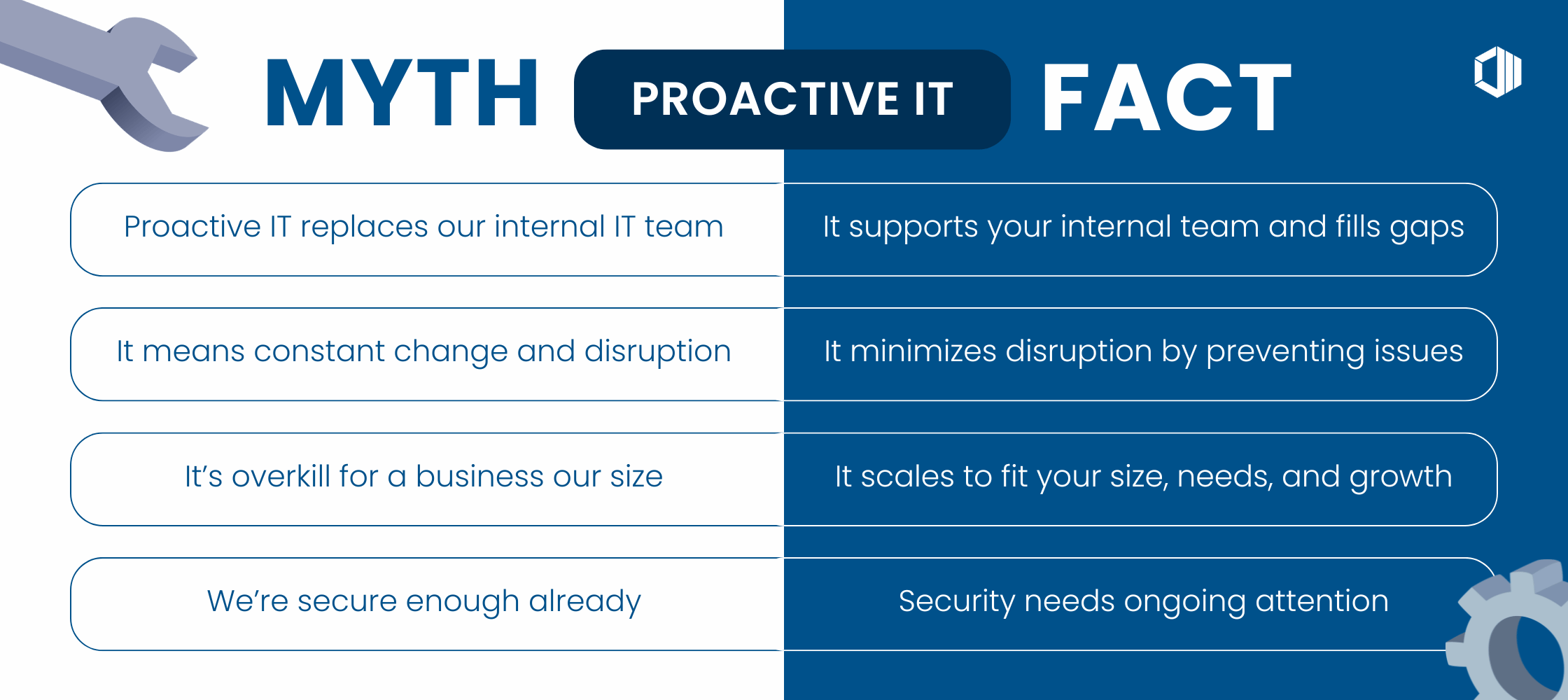
❌ Replacing your internal IT team
❌ Constant change that disrupts employees
❌ Adding complexity for the sake of looking “advanced”
❌ A rigid, one-size-fits-all setup
The goal isn’t flashy technology. The goal is technology that behaves like good infrastructure:
reliable, secure, stable, and so boring you barely notice it exists.
Want a deep dive on Managed IT and everything it entails? This is your next read:
👉 What Are Managed IT Services? (And Why You Need Them)
5 Key Benefits of a Proactive IT Partner
When IT is managed proactively, something subtle but important happens: technology stops demanding attention.
Instead of reacting to issues as they appear, your systems are quietly maintained, monitored, and improved in the background. For both IT leaders and business executives, this changes how technology feels day to day. Key benefits include:
📈
1. Less Downtime, Fewer Disruptions
Most issues are resolved before anyone even notices. That means fewer interruptions, fewer emergency calls, and smoother workdays.
Think of it like having a backstage crew for your office: the lights, sound, and props are always perfect, and no one ever sees the chaos you prevented. The result? Your team can just focus on doing their thing.
📈📈
2. Stronger Cybersecurity
When systems are monitored continuously, security stops being reactive. Patches are applied on time. Endpoints are protected consistently. Backups are tested, not assumed.
Instead of scrambling when something looks suspicious, security becomes part of the background rhythm — steady, intentional, and far less stressful.
📈📈📈
3. Predictable Monthly Costs
Instead of unpredictable emergency bills, you get a consistent monthly price that covers monitoring, maintenance, support, and strategic guidance. One of the quiet benefits of proactive IT is financial clarity. Instead of invoices that spike during outages, costs are typically structured and consistent.
That predictability makes budgeting easier and removes a layer of uncertainty, especially for organizations that are growing or planning ahead.
📈📈📈📈
4. A Bigger Bench of Expertise
Rather than relying on a single IT resource to cover everything, a proactive Managed Services Partner, like ProServeIT, helps organizations gain access to specialists across cloud, networking, cybersecurity, and strategy.
That breadth of expertise shows up when it matters, without the overhead of building a large internal team.
If this resonates, this article explores the challenge in more depth:
👉 How to Handle IT Issues When You’re Running a Lean IT Team
📈📈📈📈📈
5. A Clear Technology Roadmap
With proactive support, technology decisions stop being driven by whatever broke most recently.
Instead, you get a long-term roadmap to guide upgrades, security improvements, and scalability, aligned with where the business is headed, not just where it stumbled last time.
This ties closely to digital transformation consulting, which you can explore here:
👉 The Role of an IT Consultant in Digital Transformation
Transitioning from Break-Fix to Managed IT
Moving from break-fix to managed IT isn’t about flipping a switch. It’s a structured, low-disruption process designed to stabilize first, then improve.
Here’s what that usually looks like in practice:
Step 1: Assess Your Current Environment
Your Managed Services Provider (MSP) starts by reviewing your systems to identify risks, gaps, and opportunities, alongside business priorities. It’s about understanding what’s working, what isn’t, and what actually matters, before making changes.
Step 2: Stabilize What You Have
Foundational issues are addressed first: patching, endpoint security, access controls, and known trouble spots. This creates a stable baseline that future improvements can build on.
Step 3: Build Your IT Roadmap
A 12 to 24-month roadmap outlines what needs improvement, when, and why. It replaces reactive decisions with clear intent — tied directly to operational needs and growth plans.
Step 4: Move Into Ongoing Management
Once stabilized, systems are monitored and maintained continuously in the background. Updates happen quietly. Issues are handled early. Most days, nothing feels different...and that’s the point.
Step 5: Improve, Adjust & Mature Over Time
As your business evolves, the technology environment evolves with it. Improvements are incremental, intentional, and aligned with how the organization actually works.
If you want more detail on the “why” behind managed IT, this article is a good next read:
👉 Benefits of Using Managed IT Services
.png?width=1078&height=277&name=Break-Fix%20to%20Managed%20IT%20Transition%20(2).png)
Get Proactive with ProServeIT’s Managed IT Services
If your team is tired of putting out fires (or you’re starting to feel the hidden risks of break-fix IT!), it’s time to shift to a more stable, secure, and strategic approach.
ProServeIT’s Managed IT Services give you:
🚀 proactive monitoring
🚀 stronger cybersecurity
🚀 hands-on support
🚀 predictable costs
🚀 guided strategy
🚀 a more resilient business overall
You don’t have to wait for something to break. You can stay ahead of problems, reduce downtime, and support your team with the right tools and guidance.
Frequently Asked Questions (FAQs)

Kaavya is a creative enthusiast at ProServeIT, with a passion for writing, designing, and storytelling. As a marketer with a strong foundation in copywriting, she brings a unique blend of creativity and strategic insight to her role, helping to craft compelling content that aligns with ProServeIT’s mission.



Comments