Why Managed IT Services Aren't Complete Without Integrated Cybersecurity
Here’s a strange thought: your business probably has more digital doors than physical ones.
Every email sent. Every file shared. Every login, app, laptop, phone, and Wi-Fi connection. All quietly opening and closing all day long, carrying ideas, money, and customer trust back and forth at lightning speed.
Keeping those doors “locked” isn’t just an IT problem, it’s a business problem. When security slips, it’s not just tech that falters: projects stall, customers notice, and reputation takes a hit. IT security is the invisible safety net that keeps your business running smoothly, protecting both your bottom line and your brand.
Here’s the kicker: small and mid-sized businesses across North America are prime targets. SMBs often have fewer resources, smaller security teams, and more gaps to exploit. To add to that, cybercriminals aren’t kicking down doors anymore, they’re walking through the ones you didn’t even know were open, and AI is giving them a serious head start.
You don’t need to panic, though. IT security isn’t about building an impenetrable fortress overnight. It’s about understanding the landscape, spotting the weak spots, and taking smart, steady steps to protect your business, your customers, and your team.
So, let’s slow it down for a moment.
Let’s talk about what IT security really is, and why it matters so much for businesses like yours.
In this blog, you will find:
⚔️ IT Security vs. Cybersecurity: What’s the Difference?
🔗 The CIA Triad: The Foundation of IT Security
💼 Why IT Security Is a Business Issue, Not Just an IT One
📰 The Current Threat Landscape for IT Security
⁉️ Which Sectors Are Facing the Most Cyberattacks?
🚨 Why Your Organization Should Care (Even If You're Not in These Sectors)
🏢 Why SMBs Are Prime Targets for Cyber Attackers
⚠️ The Biggest Security Threats Facing SMBs in 2026 and Beyond
💪 How Managed IT Services Strengthen Your Security Posture
🪜 Practical Steps to Improve Security Today
🔒 Protect Your Business with ProServeIT’s Managed IT Solutions
What Is IT Security?
Imagine a high-tech vault around your business data: reinforced steel walls, biometric locks, laser grids, and an AI-powered guard dog that never sleeps. That’s what IT security is: a system designed to keep your information safe from prying eyes, tampering hands, and catastrophic breakdowns.
At its core, IT security (Information Technology Security) is about protecting the systems, data, and digital infrastructure your business relies on every single day from unauthorized access, misuse, disruption, or destruction.
IT security is everywhere...when you enter a password, verify a login code, or see that little padlock icon in your browser. It’s the invisible safety net behind your email inbox, cloud apps, and company Wi-Fi. We’ll break down these layers in later sections.
IT Security vs. Cybersecurity: What’s the Difference?
These two terms get tossed around like they mean the same thing. They don’t. But they are related.
Cybersecurity is about stopping digital bad actors. Phishing emails, ransomware, sketchy links, unauthorized logins — this is the front-line defense against online attacks. Think shields up, alerts on, keep the hackers out.
IT security is the whole system working together. It includes cybersecurity, but also covers devices, data, access, backups, policies, and the human side of things. It’s not just about blocking attacks — it’s about keeping the business steady, reliable, and running no matter what.
An easy way to remember it:
-
Cybersecurity protects your systems
-
IT security protects your business
Cybersecurity locks the doors. IT security makes sure the lights stay on, the right people have the keys, and there’s a plan if something unexpected happens.
When they work together, security stops feeling reactive and starts feeling… quiet. And in security, quiet is a very good thing.
The CIA Triad: The Foundation of IT Security
Every security strategy needs a blueprint i.e. a clear definition of what “secure” actually means.
For IT security, that blueprint is the CIA Triad. And no, we’re not talking about secret agents in trench coats.
This CIA stands for Confidentiality, Integrity, and Availability. Three principles that make your digital world trustworthy and resilient.
Why these three? Because they cover the basics of what makes information useful: it has to stay private, stay correct, and stay available when you need it.
Think of them as the three load-bearing pillars in the skyscraper of your business. Remove one, and the whole structure becomes unstable.
This is the “keep it secret” principle. Sensitive data, like customer records, payroll, or intellectual property, should only be accessible to authorized people. Without confidentiality, it’s like leaving the doors to your building unlocked and hoping no one walks in.
2. Integrity 🤝
Data should remain accurate and unaltered. If someone tampers with your financial reports or changes product specs, even slightly, the ripple effect can cause operational chaos. Integrity is the guarantee that what you see is what you can trust, like a tamper-proof seal on a medicine bottle.
3. Availability ✅
Your systems and data must be ready when you need them. Downtime caused by ransomware or server outages is like the elevator breaking in your skyscraper. You can’t reach the floors you need, and business grinds to a halt. Availability ensures the lights stay on and the doors stay open.
Types of IT Security
If the CIA Triad is the blueprint, these are the building blocks, the layers that make your digital fortress strong. Just like no single lock can protect everything, no one layer can either. Attackers look for weak spots, so security works best when multiple defenses overlap like shields.
Here are the key types of IT security every SMB should know:
🛡️
1. Data Security
Imagine data security as a very secure safe inside a vault. It focuses on preventing unauthorized access, accidental leaks, and data loss.
What it includes:
- Encryption (protects data even if stolen)
- Backups (copies of data stored securely for recovery)
- Retention policies (rules for how long data is kept)
Why it matters: Even if someone gets in, your most valuable asset, data, should remain protected.
🛡️
2. Identity & Access Management (IAM)
Let's think of Identity & Access Management as the password you need to get into the safe. It is like the ID checkpoint at every door. IAM ensures the right people have the right access at the right time.
What it includes:
- Multi-Factor Authentication (MFA) (extra verification beyond passwords)
- Single Sign-On (SSO) (one login for multiple apps, reducing password fatigue)
- Role-based access controls (employees only access what they need)
Why it matters: Most breaches start with stolen credentials. Strong identity controls stop attackers before they even get inside.
🛡️
3. Cloud Security
Your cloud is the vault in the sky. It is the vault inside which your secure safe (i.e. your data security) lives. It holds critical data and apps. Many organizations assume the cloud is automatically secure, but you still need proper configurations, identity management, and monitoring.
What it includes:
- Identity management (controls who can access cloud resources)
- Encryption (scrambles data stored in the cloud)
- Configuration checks (ensures settings aren’t leaving doors open)
Why it matters: Misconfigured cloud settings are one of the leading causes of data breaches.
🛡️
4. Application Security
Applications are the tools your team uses daily including cloud apps like Microsoft 365, CRMs, and custom-built platforms. If they’re not inspected, they can carry hidden threats.
What it includes:
- Secure coding practices (developers write code that resists attacks)
- Vulnerability scans (checks for weaknesses in apps)
- Regular patching (updates that fix security holes)
Why it matters: Apps are prime targets for attackers looking for loopholes.
🛡️
5. Endpoint Security
Every laptop, phone, or tablet is like a door into your business. Endpoint security ensures those doors have locks and alarms. Modern endpoint security uses advanced monitoring and AI-based tools to spot suspicious behavior.
What it includes:
- Antivirus software (detects and removes malicious programs)
- Device encryption (scrambles data so it’s unreadable if stolen)
- EDR tools (Endpoint Detection and Response; advanced monitoring for suspicious activity)
Why it matters: A single compromised device can become an open gateway for attackers.
🛡️
6. Network Security
If your data security is the safe and your cloud is the vault, think of this as the walls and gates around your digital city. Network security protects the pathways data travels through like your Wi-Fi, routers, and internal connections.
What it includes:
- Firewalls (digital barriers that block unauthorized traffic)
- VPNs (Virtual Private Networks that create secure tunnels for data)
- Intrusion Detection Systems (tools that alert you if someone tries to break in)
Why it matters: Without strong walls, attackers can slip in and move freely across your systems.
🛡️
7. Operational Security
Technology alone isn’t enough. People and processes matter. Operational security covers the human side of protection.
What it includes:
- Security awareness training (teaches employees to spot phishing)
- Phishing simulations (tests how staff respond to fake attacks)
- Clear policies (guidelines for handling sensitive data)
Why it matters: A single click on a malicious link can undo all your tech defenses. Training turns employees into your first line of defense.
.png?width=1920&height=1080&name=Infographic%20(Presentation).png)
For SMBs, this layered approach is critical because attackers often look for the easiest way in, and that’s usually a weak link in one of these areas. If one layer fails, others hold the line, and that's crucial for businesses without a large IT team.
Why IT Security Is a Business Issue, Not Just an IT One
You know what's interesting? A lot of business owners think IT security is something their tech person handles in the background. And honestly, that makes sense...it sounds like a tech thing.
But here's what's actually going on: your entire business runs on technology now. Customer orders, vendor communications, your accounting software, that cloud platform everyone uses, it's all digital infrastructure. And when that infrastructure isn't secure, your business can't function. A security incident isn't just a problem for IT to solve quietly. It creates real, tangible consequences that affect every part of your operation.
Let's walk through what that looks like:
📉 Downtime Means Lost Revenue
When your systems go offline, so does your ability to operate. You can't process payments. You can't access customer records. You can't fulfill orders. Every minute of downtime is money you're not making and customers you're not serving.
⛓️💥 Damaged Reputation Means Lost Trust
Your customers share their information with you because they trust you to keep it safe. When a breach happens, that trust evaporates instantly. And in today's connected world, word spreads quickly. Rebuilding trust takes time, sometimes years.
‼️ Regulatory Fines Mean Serious Consequences
Data protection regulations like GDPR and HIPAA aren't optional. They come with substantial penalties for businesses that fail to protect customer data properly. For small and mid-sized businesses, these fines can be devastating.
🛑 Operational Disruption Means Everything Stops
Imagine this: a breach locks your files. Your team can't access the tools they need. Projects halt. Deadlines get missed. Your entire operation freezes while you figure out how to recover.
Here's something McKinsey found in their 2025 research: companies have started treating cybersecurity as a strategic business priority, not just a technical requirement. It's become a genuine competitive advantage.
And there's a reason for that shift. The threat landscape is changing rapidly. Attacks are becoming more sophisticated and more targeted, and small to mid-sized businesses are increasingly in the crosshairs.
So, let's explore what's actually happening out there.
The Current Threat Landscape for IT Security
Picture the internet as an enormous ocean. Every day, Microsoft processes over 100 trillion security signals. That's like having buoys scattered across every wave, constantly measuring currents, temperatures, and looking for sharks.
In case you were wondering, a security signal is any piece of information that might indicate something suspicious: a login attempt from an unusual location, a file download at 3 AM, an email with a strange attachment, software trying to access data it shouldn't. Each signal is a tiny clue. When you process 100 trillion of them daily, you start seeing patterns.
And guess what they're finding: most cyberattacks today are about holding your business hostage for money. Criminals lock your files, freeze your systems, and demand payment to give you back access.
So, what are those 100 trillion signals detecting? Let's look at who's being targeted.
Which Sectors Are Facing the Most Cyberattacks?
Some industries have bigger targets on their backs than others. Government agencies and IT companies each take 17% of cyberattacks. Makes sense, right? They're packed with valuable data, connected to everything, and controlling critical systems.
But here's something fascinating: research institutions and universities get targeted because attackers use them as training grounds. Think of it like this, before attempting a major heist, criminals practice on smaller, easier targets. Universities have valuable research data but often weaker security, making them perfect testing grounds for new attack techniques before criminals go after the big players.
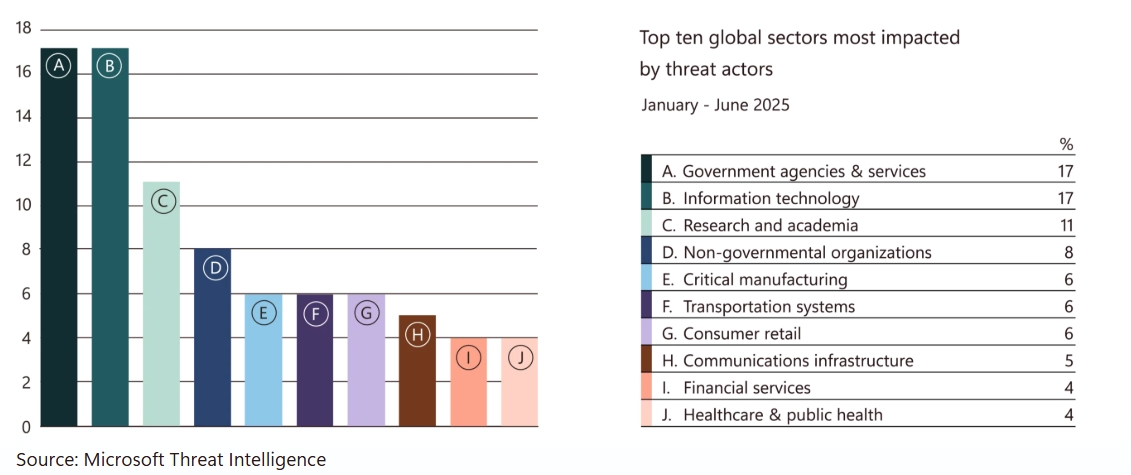
Hospitals, schools, and local governments face a surge in attacks because they're sitting on sensitive data while running on tight budgets and outdated systems. When these organizations get hit, the consequences are immediate: surgeries get postponed, classes shut down, public services grind to a halt. Attackers know these sectors will pay quickly to get critical services back online. It's calculated and it's ruthless.
Why Your Organization Should Care (Even If You're Not in These Sectors)
Let's say you run a small marketing agency. You're not a hospital. You're not a government office. You might think, "I'm not a target." But hold on.
Your business uses cloud accounting software, right? A customer relationship management system? Payroll services? Email platforms? Every one of those connections is a potential entry point.
So, when your software vendor gets breached, when your cloud provider gets compromised, when your payment processor's security fails, that problem becomes your problem through those trusted digital connections.
Think of it like a neighborhood water system. Your house might have perfect plumbing, but if the main line gets contaminated, everyone downstream is affected. In today's business world, we're all connected to the same digital infrastructure. A breach anywhere can flow everywhere.
Why SMBs Are Prime Targets for Cyber Attackers
If you were a thief, would you rob one heavily guarded bank or ten corner stores with basic locks?
Less effort. Higher success rate. Ten smaller scores add up fast. That's exactly how cybercriminals see small and medium businesses.
SMBs are digital enough to be valuable, processing payments, storing customer data, using cloud software. But most don't have security operations centers, specialist teams, or enterprise budgets.
Chances are you’ve got a lean IT setup, basic antivirus, and employees with little formal security training. For attackers, that's an unlocked door in a secure neighborhood. In fact, nearly half of Canadian SMBs admit they’re underprepared for cyberattacks.
And when attacks hit, they’re costly. IBM’s Cost of a Data Breach Report 2025 shows the average U.S. cost of a breach reached a record $10.22 million. Criminals don’t need millions from one victim, they just line up twenty smaller ones.
The good news? Being small gives you agility. You can make decisions faster, implement changes quicker, and train your team in an afternoon. You're not too small to be a target. You're exactly the right size. Once you accept that, you can build defenses that actually work.
The Biggest Security Threats Facing SMBs in 2026 and Beyond
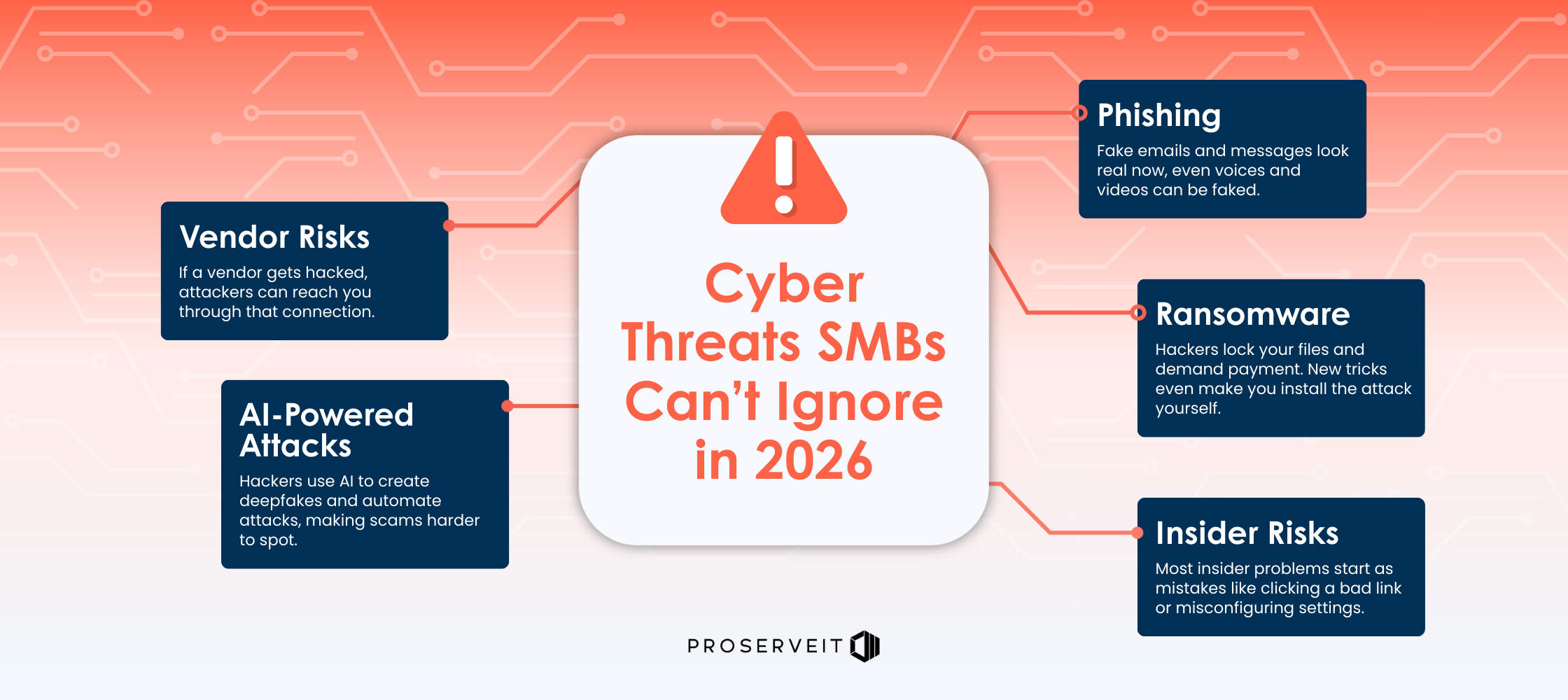
Cybercriminals aren’t just working harder, they’re working smarter. Here’s what’s small and medium sized businesses should watch out for in 2026 and beyond:
⚠️
1. Phishing Attacks
Phishing is when someone pretends to be a person or company you trust, usually through email, to trick you into handing over passwords or payment info. Think of it as catfishing, but for your bank account.
Example: Your finance manager receives an email that looks identical to one from your regular supplier. Same logo, same signature, same tone. It asks to update payment details for the next invoice. The only difference? The bank account belongs to criminals. By the time anyone realizes, $30,000 is gone.
Remember when phishing emails were easy to spot? Terrible grammar, suspicious links, that "faraway prince" asking for help? Those days are over. Microsoft found 28% of breaches start with phishing or social engineering. And thanks to AI, these emails are now Oscar-worthy, sometimes paired with deepfake voices or videos.
⚠️
2. Ransomware
Ransomware is exactly what it sounds like: criminals lock your files and demand payment to give them back. Pay up, or lose everything. It’s like a digital kidnapper...minus the ski mask.
Example: On a Monday morning, your team arrives to find every computer screen displaying the same message: "Your files have been encrypted. Pay $75,000 in Bitcoin within 48 hours or lose everything." Your customer database, financial records, project files, all locked.
Over 52% of attacks with known motives are driven by extortion or ransomware, and IBM reports the average cost of a ransomware breach is $5.08M. For small businesses, ransomware is devastating. Your systems freeze. Your team can't work. Every hour of downtime is lost revenue. And even if you pay the ransom (which experts strongly advise against), there’s no guarantee you’ll get your data back.
Nowadays attackers are using "ClickFix," where users are tricked into copying malicious commands into their computer's terminal. A pop-up appears that looks like a legitimate software update, instructing employees to press certain keys to "fix" an issue. They're actually installing malware.
⚠️
3. Insider Risks
Not all threats come from faceless hackers in hooded sweatshirts. Sometimes the danger is sitting right in your office. Insider threats come from employees or contractors, sometimes by mistake, sometimes on purpose. One wrong click or a bad decision can open the door to attackers.
Example: Your sales executive receives what looks like a document from a client. They click to open it. Nothing happens...or so they think. In reality, they've just installed malware that's now quietly spreading through your network, collecting passwords and financial data.
Or consider this: A departing employee who feels they were treated unfairly downloads your entire customer list and pricing strategy before their last day. Three months later, your competitor somehow knows exactly how to undercut every proposal you submit.
IBM found malicious insider attacks (i.e. ones done on purpose) cost the most. They also take 260 days on average to fix. That’s almost nine months of cleanup. While malicious insider attacks may be more costly, accidental insider threats, like employees clicking malicious links or misconfiguring cloud settings, are far more common.
⚠️
4. AI-Powered Attacks
AI isn't just helping defenders, it's supercharging attackers too. Criminals now use AI to make attacks faster, smarter, and harder to spot (like the phishing emails we mentioned earlier).
Example: Your HR director receives a video call from someone who looks and sounds exactly like your company's founder, asking them to urgently transfer funds for a "confidential acquisition." The video is smooth. The voice is perfect. Even specific mannerisms are right. It's a deepfake, and it's so convincing that the transfer goes through before anyone questions it.
IBM reports 16% of breaches involved attackers using AI, often for phishing or impersonation. Microsoft says AI-driven forgeries grew 195% globally, and deepfakes can now beat selfie checks. Scary, right?
⚠️
5. Vendor & Supply Chain Risks
Your security is only as strong as your weakest connection. And in today's interconnected world, that weak link might not even be in your building. If a vendor you rely on gets hacked, attackers can use that connection to reach you. This includes software providers, payment processors, or even your cloud services.
Example: Your payroll service provider gets compromised. Suddenly, attackers have access to every employee's Social Security or SIN number, bank account details, and home address. Now you're dealing with not just a data breach, but potential identity theft for your entire team.
IBM shows 15% of breaches come from third-party or supply chain compromise, costing $4.91M on average and taking on average 267 days to resolve. That’s almost a year of headaches.
👉 You can read more in our blog about Vendor Risk Management Tips.
Notice the pattern? These threats are getting faster, smarter, and harder to detect. Traditional security isn't enough anymore. Data theft is now the norm. Microsoft observed data collection in 80% of incidents.
All hope is not lost, though! Modern defenses exist that can keep pace with these evolving threats.
The question is: are you ready to deploy them?
How Managed IT Services Strengthen Your Security Posture
If your team is stretched thin or your internal IT resources are limited, partnering with a managed IT service provider (MSP) like ProServeIT can fill the gaps.
Think of an MSP as your security pit crew. While you’re focused on driving the business forward, they’re checking the tires, tightening bolts, and watching the track for hazards you haven’t even reached yet.
Here’s how they level up your security game:
✅
1. Continuous Monitoring & Threat Detection
Most cyber threats aren’t dramatic. There’s no explosion, no flashing warning lights. It’s more like a faint creak in the hallway at 2:14 a.m.
A strong MSP uses advanced monitoring tools to quietly watch over your environment, servers, networks, cloud apps, and endpoints, in real time.
They look for things like:
- Logins that don’t match normal patterns
- Systems behaving slightly out of character
- Backups that don’t complete as expected
- Files or processes doing things they really shouldn’t
Each of these signals on its own might be nothing. Together, they tell a story.
Behind the scenes, security professionals review those signals and investigate when something feels off. It’s part science, part pattern recognition, part intuition, and it helps catch issues early, when they’re still easy to contain.
As attackers use AI to move faster and blend in better, continuous monitoring becomes less about panic and more about awareness. Someone’s always watching the dashboard, calmly steering things back on course when needed.
✅
2. Patch & Update Management
Everyone knows updates matter. Almost no one enjoys managing them.
Modern businesses rely on dozens of tools, devices, and platforms, each with its own update schedule. Miss one important patch, and you might leave a door ajar that attackers already know how to open.
An MSP handles the full lifecycle:
- Tracking what needs updating
- Testing patches before rollout
- Scheduling updates during quiet hours
- Applying them consistently across devices
- Double-checking that everything landed correctly
Think of this as routine maintenance on a very fast-moving machine. Quiet, methodical work that keeps everything running smoothly, and prevents small issues from turning into big ones.
✅
3. Proactive Defense, Not Reactive Fixes
Reactive security waits for alarms. Proactive security quietly reduces the chances they’ll ever go off. A proactive MSP is constantly tightening, tuning, and reinforcing your environment.
This often includes:
- Regular security checkups
- Closing unused access points
- Refining permissions and admin rights
- Reviewing who has access to what (and why)
- Correcting cloud misconfigurations
- Running phishing simulations
- Updating firewall and endpoint rules
- Refreshing security policies as your business evolves
It’s the digital equivalent of preventative care (just like you’d service a vehicle before it fails on the highway). Small, consistent improvements that add up to a much stronger foundation over time.
✅
4. Expert Guidance & Security Strategy
Security tools without a strategy are like hiking gear without a trail map. Impressive, but not especially helpful.
A good MSP helps leadership teams zoom out and ask the bigger questions:
- Where are we most exposed today?
- Which risks actually matter for our business?
- What’s worth investing in now, and what can wait?
- How do we grow securely without adding friction?
Instead of reacting to headlines or buying tools out of fear, you get a clear, phased roadmap that aligns security with business goals. That’s when security stops feeling like a constraint and starts working quietly in your favor, which ties directly into Why IT Strategy Matters.
✅
5. Backup & Recovery Support
Backups aren’t exciting. They’re reassuring. They’re the reason a bad day doesn’t turn into a bad year.
An MSP ensures your safety net is actually there when you need it by:
- Setting up secure, encrypted backups
- Automating backup schedules
- Regularly testing recovery (the part many people forget)
- Storing copies offsite or in the cloud
- Prioritizing fast recovery for essential systems
If something unexpected happens, like a system issue, accidental deletion, or cyber incident, backups let you reset the clock and keep moving forward with minimal disruption.
Managed IT Services aren’t about fear, fixes, or firefighting. They’re about calm, consistency, and confidence. They reinforce your internal team, add depth and visibility, and help your business stay steady as technology and threats continue to evolve.
IT security doesn’t have to feel heavy. When it’s done well, it fades into the background… and that’s exactly the point.
👉 Related reading: The Benefits of Using Managed IT Services.
Practical Steps to Improve Security Today
Security improvements don’t have to happen all at once. Many organizations start by strengthening what they already have, then build from there over time.
Security is like climbing a ladder. You don’t leap to the top. you take one solid step at a time. Each step makes the next one easier and your footing more secure.
💡
1. Turn On Multi-Factor Authentication (MFA)
Passwords alone aren’t enough anymore. They’re easy to steal, reuse, or guess. Multi-factor authentication adds a second check before access is granted, such as a code, an app prompt, or a biometric.
Even if a password is compromised, MFA usually stops attackers in their tracks. It’s one of the simplest changes you can make, and one of the most effective ways to reduce risk across email, cloud apps, and remote access.
💡
2. Provide Regular Security Training
Your employees are part of your security system, whether you intend them to be or not. Regular training helps them recognize suspicious emails, avoid risky links, and know when something feels off.
Short, ongoing sessions work far better than one long annual presentation. A few reminders throughout the year can dramatically reduce successful phishing attempts and help issues get reported early.
💡
3. Set Up a Strong Backup Strategy
Backups won’t prevent an attack, but they can prevent a crisis.
A strong backup strategy ensures your data is copied securely and automatically, stored separately from your primary systems, and tested so you know recovery actually works. When files are deleted, systems fail, or ransomware strikes, backups allow you to restore operations without starting from scratch.
💡
4. Review User Access Regularly
Access tends to accumulate over time. People change roles, take on new responsibilities, or leave the company, but permissions often remain.
Reviewing user access helps ensure employees can reach what they need to do their jobs and nothing more. This limits accidental exposure and reduces the potential impact if an account is compromised.
💡
5. Keep Software Up to Date
Software updates do more than add features. They close security gaps that attackers actively look for.
Keeping operating systems, applications, and devices up to date helps reduce known vulnerabilities and keeps your environment stable and secure. Consistency matters more than perfection here; the goal is to avoid falling behind.
💡
6. Know What You’re Protecting
It’s hard to secure what you can’t see.
Having a basic understanding of the devices, applications, and systems in your environment helps identify blind spots and prioritize protection. Even a simple inventory creates visibility and makes smarter security decisions easier.
Each of these steps strengthens your foundation on its own. Together, they create a much more resilient environment. And when you’re ready to go further, managed IT services can help turn these practical actions into a structured, long-term security approach, without adding complexity.
IT Security FAQs
Conclusion
Every click, every login, every file shared is a door swinging open in your business. The question isn’t whether those doors exist, it’s whether they’re secure.
In a world where attackers move fast and AI is rewriting the rules, IT security isn’t a “nice-to-have.” It’s the foundation that keeps your business steady, your customers confident, and your reputation intact.
The smartest move is to start small, start now, and don’t do it alone. Security works best when it’s layered, proactive, and backed by expertise that never sleeps. That’s where we come in.
Protect Your Business with ProServeIT’s Managed IT Solutions
IT security doesn’t need to be overwhelming, and you don’t need to tackle it alone. ProServeIT’s Managed IT Services give you the tools, expertise, and support to stay ahead of today’s fast-moving cyber threats, without the complexity.
If you want to strengthen your security posture, reduce risk, and protect your business long-term, ProServeIT is here to help.

Kaavya is a creative enthusiast at ProServeIT, with a passion for writing, designing, and storytelling. As a marketer with a strong foundation in copywriting, she brings a unique blend of creativity and strategic insight to her role, helping to craft compelling content that aligns with ProServeIT’s mission.

Comments