

ProServeIT Named One of Canada's Top Small & Medium Employers 2026
The AI landscape isn't just changing, it's quietly redrawing how work gets done inside Microsoft 365.
Between Microsoft's newest Frontier Suite (Microsoft 365 E7), the introduction of Agent 365, and major Copilot updates rolling out with Wave 3, there's a lot to unpack.
As a Microsoft Partner working at the forefront of AI, we wanted to help break it all down in a way that feels clear, practical and actionable.
Recently, we hosted a live walkthrough and Ask-Me-Anything session where our CTO, Jaime McMahon, and licensing expert, Simone Evans, unpacked everything from Copilot Cowork to E7 pricing, and answered questions from attendees in real time.
This article covers the key takeaways from that session, standout moments, and practical next steps to help you figure out what these changes mean for your organization.
👉 Watch the full webinar recording
Table of Contents
🚀 What's New in Copilot Wave 3?
🤝 What Is Copilot Cowork and Why Does It Matter?
📄 What Is Agent Mode in Microsoft Copilot?
🧠 What Is Multi‑Model AI in Copilot?
🛡️ What is Agent 365 and How Does it Handle AI Governance?
🤖 What Does Microsoft 365 E7 Signal About the Future of AI at Work?
⚖️ E7 vs. E5: Is the Upgrade Right for You?
❓ Highlights from the Live Q&A
🎥 Watch the Full Webinar Recording
👉 Next Steps and How ProServeIT Can Help
❓ FAQs
What's New in Copilot Wave 3?
Microsoft 365 Copilot Wave 3 is the next major evolution of Copilot and AI capabilities, announced by Microsoft in March 2026 and rolling out in phases throughout the year, with major capabilities lining up alongside the May 1, 2026 launch of Microsoft 365 E7 and Agent 365.
Where Wave 2 focused on bringing Copilot into everyday apps, Wave 3 is about making Copilot more agentic, meaning it can now carry out multi-step tasks, work autonomously within your documents, and tap into the best AI models available, all within your secure Microsoft environment.
As Jaime put it during the session:
Wave 3 includes four major updates:
🤝 Copilot Cowork: multi-step, real-time task execution
📄 Agent Mode: Copilot working inside your open documents
🧠 Multi-Model AI: choose between OpenAI and Anthropic models within Copilot
🛡️ Agent 365: centralized governance for AI agents
Let's walk through each one.
What Is Copilot Cowork and Why Does It Matter?
Copilot Cowork is already rolling out. It's a new Microsoft 365 experience where people and AI agents collaborate side by side on multi-step work.
Instead of responding to a single prompt, Cowork:
-
Breaks a goal into multiple tasks
-
Assigns those tasks to digital agents
-
Executes them in parallel
-
Lets you watch, guide, and redirect work in real time
Jaime, CTO at ProServeIT, called Cowork one of the most significant updates Microsoft has introduced, and for good reason.
It lives alongside your existing Microsoft 365 apps and pulls from your emails, files, calendars, and Teams conversations to get the job done.
How Copilot Cowork Works in Practice
During the webinar, Jaime shared a common scenario: preparing a Quarterly Business Review with a client.
Normally, this involves:
-
Tracking down support ticket trends
-
Reviewing financials
-
Pulling account activity
-
Building a presentation
All of this often requires multiple systems.
With Copilot Cowork, one prompt kicks off the entire workflow. Each task runs in parallel, progress is visible in real time, and adjustments can be made on the fly, without stopping what’s already in motion. A comprehensive presentation is created and may be edited as desired for the client meeting.
A Real‑World Example from ProServeIT
Jaime shared how he used Cowork to prepare a presentation for ProServeIT's internal "AI Corner" meeting — a recurring meeting where the team explores the latest in AI and shares learnings across the organization.
He gave Copilot Cowork one prompt: "Create an executive summary of the last three AI Corner meetings, use the ProServeIT brand template, and build a slide deck."
Cowork proceeded to:
-
Find the meeting transcripts on its own
-
Locate the brand guideline template, which Jaime didn't mention
-
Created the full presentation using ProServeIT's fonts, logos, and color scheme.
The result didn't look like a generic, auto-generated PowerPoint... it looked like something someone on the team had built.
The key difference from standard Copilot? Cowork doesn't just answer a question, it carries out work from start to finish, with multiple steps happening at once, all while keeping you in the loop.
What Is Agent Mode in Microsoft Copilot?
Agent Mode is a "content creation agent" inside Microsoft 365 Copilot that creates and edits content directly in Word, Excel, PowerPoint, and Outlook.
Where classic Copilot offers suggestions in a side panel beside your work, Agent Mode steps into the work.
A useful way to think about it:
-
Classic Copilot = “Here are some suggestions.”
-
Agent Mode = “Here’s a plan, I’ll do the steps, and you can steer.”
It’s less like asking for a one‑off answer, and more like giving a capable teammate a brief, then reviewing what they build.
Agent Mode shows up slightly differently in each app, but the pattern stays the same: Copilot works in context, not as a side panel you copy and paste from.
How Does Agent Mode Work in Excel?
In Excel, Agent Mode acts like a junior analyst working inside your spreadsheet.
When you describe an outcome (for example, “analyze this data and make it visual”), Agent Mode can:
-
Examine the entire dataset
-
Decide which formulas, calculations, or transformations are needed
-
Create new tabs or sheets
-
Generate charts and summaries
-
Leave the results structured directly inside the workbook
In other words, it can build the full analysis for you, the kind of end‑to‑end Excel work someone would normally spend hours assembling manually.
During the webinar, Jaime McMahon described opening a General Ledger or accounts receivable report and asking Copilot to analyze the data, create a new tab, generate visualizations, and surface a trailing twelve‑month view, all without stepping outside Excel or guiding it step by step.
How Does Agent Mode Change Work in Word?
In Word, Agent Mode shifts Copilot from writing snippets to helping build the document itself.
Instead of replying with text suggestions in a side panel, Copilot works directly inside the document. When you explain what you’re trying to create, Agent Mode can:
-
Lay out the overall structure of the document
-
Draft sections in sequence based on your brief
-
Rewrite or reorganize existing content
-
Maintain tone and flow across sections
-
Apply edits directly in the document as it works
The key difference is that the document takes shape as a whole, rather than being assembled piece by piece, helping you get to a complete draft faster.
How Does Agent Mode Work in PowerPoint?
In PowerPoint, Agent Mode behaves more like someone who builds presentations from a storyline, not someone who just fills slides.
When you describe the goal of the deck, Agent Mode can:
-
Decide how many slides are needed
-
Determine what content belongs on each slide
-
Organize ideas into a logical flow
-
Draft slide titles and key talking points (speaker notes)
-
Apply consistent layout and structure across the deck
Instead of generating isolated slides, it assembles the first real version of the full presentation.
How Does Agent Mode Work in Outlook?
Outlook is a different type of app, and Agent Mode reflects that.
The goal here isn't to "build a thing" like a spreadsheet or document. It's to act as a coordination layer across your emails and calendar, drafting messages, triaging your inbox, and moving calendar work forward on your behalf.
In Outlook, Agent Mode can:
-
Draft emails for you using context from prior threads, your calendar, and the people involved
-
Take inbox actions including summarize threads, surface what needs a reply, flag what can wait
-
Handle calendar work such as finding suitable times, scheduling meetings, rescheduling when things shift
-
Move conversations forward by pulling together the context already living across your emails and meetings
Rather than generating a single email in isolation, Agent Mode treats your inbox and calendar as one connected workflow, and acts inside it.
In simple terms: less time writing and clicking, more time deciding.
What Is Multi‑Model AI in Copilot?
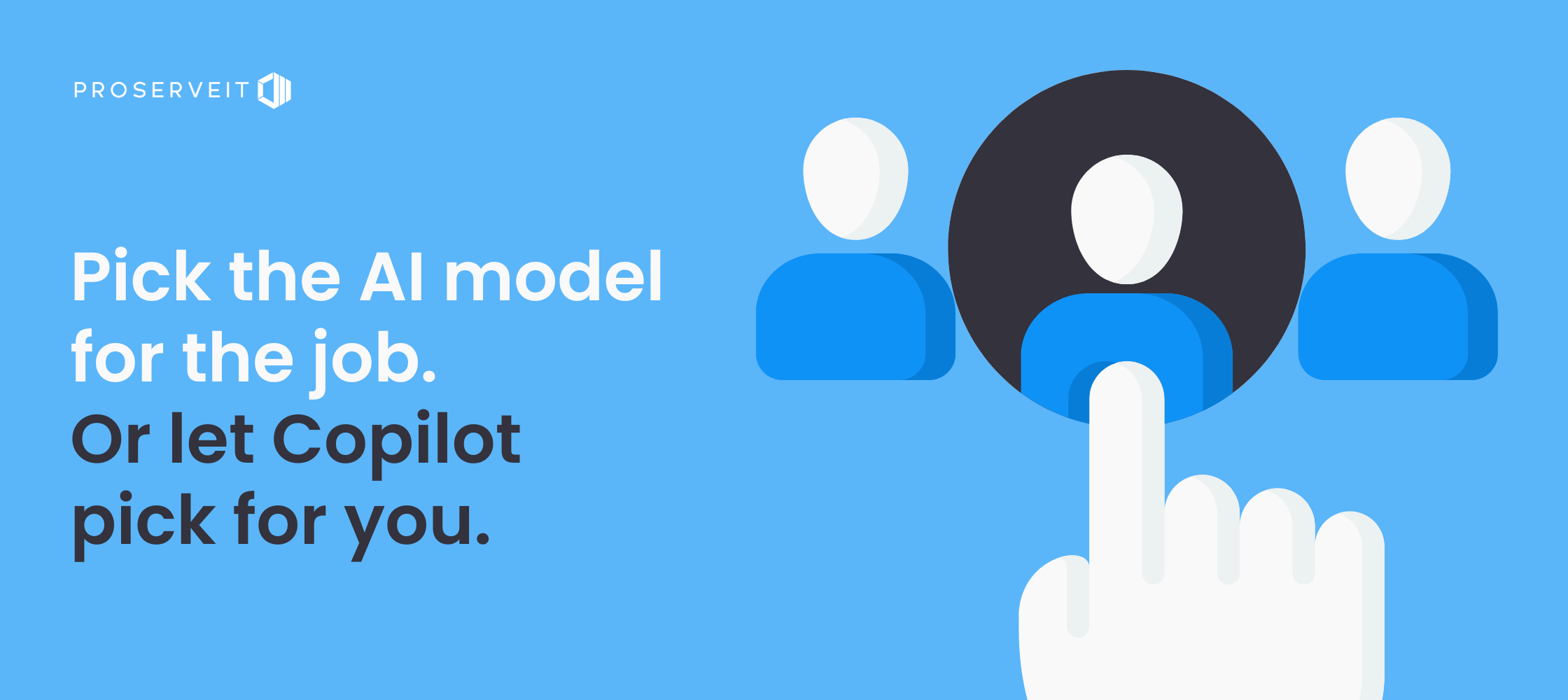
Multi-model AI in Microsoft Copilot Wave 3 means Copilot can now use multiple leading AI models, OpenAI's GPT-5.3 and GPT-5.4, and Anthropic's Claude Sonnet and Opus 4.6, natively within Copilot chat. Until now, most Copilot experiences relied on a single underlying model.
The idea behind “multi‑model AI” is straightforward: different tasks benefit from different AI model strengths.
Some work requires fast, general‑purpose responses, while other tasks require deeper reasoning, more structured analysis, or stronger validation.
Rather than forcing one model to handle everything, Microsoft is giving Copilot access to “the right model for the job,” while keeping all of it inside Microsoft’s secure, governed environment. You may decide to select the AI model to use for a particular activity, or let Copilot to select the best fit.
Why Is Microsoft Moving to a Multi‑Model Approach?
As Copilot becomes more “agentic”, carrying out multi‑step work instead of just answering prompts, the intelligence behind it needs to be more flexible.
During the live session, Jaime explained:
From a user perspective, this complexity stays mostly behind the scenes. While you can choose models manually, Copilot handles that orchestration behind the scenes for you.
Most importantly, it reinforces the broader theme of Wave 3: Copilot is no longer just about responding to prompts, it’s being designed to execute real work end‑to‑end.
As Copilot takes on more responsibility, the question shifts from “what can it do?” to “how do we manage and govern it?”, which is exactly where Agent 365 comes in next.
What is Agent 365 and How Does it Handle AI Governance?
As Copilot becomes more capable, executing multi‑step work, running agents in parallel, and operating across documents, data, and conversations, one question quickly emerges: how do you keep all of this governed, secure, and under control?
That question came up during the session as Jaime walked through what happens after Copilot starts taking on real responsibility. Once AI moves beyond answering prompts and begins executing work across files and workflows, visibility and control become essential.
That’s where Agent 365 comes in.
Agent 365 is Microsoft’s central control plane for AI agents, giving organizations a single place to observe, manage, and govern agents as they become part of everyday work, much like how IT teams already manage users, devices, and applications across Microsoft 365.
📌 For a deeper breakdown on how Agent 365 fits inside Microsoft 365 E7, see our explainer: Microsoft 365 E7 Explained: What It Is, What's Included, Pricing
What Does Agent 365 Actually Do?
Agent 365 is designed to help organizations answer very practical questions as agent usage scales:
-
Which AI agents exist in our environment?
-
What data and systems can they access?
-
What work are they performing?
-
Who is accountable for them?
To support this, Agent 365 provides:
-
A centralized registry of agents, including Microsoft‑built agents, partner solutions, and custom agents registered by the organization
-
Visibility into agent activity and behavior, allowing teams to understand how agents are operating over time
-
Governance and security controls, covering identity, access, and lifecycle management for agents
-
Monitoring and oversight, helping IT and security teams track usage, performance, and potential risk
In short, Agent 365 adds structure and guardrails to what would otherwise be a rapidly growing, and difficult to track, agent ecosystem.
How Agent 365 Fits Into the Bigger Picture
Each Wave 3 capability handles execution. Agent 365 handles oversight.
Here's how they work together:
🤝 With Copilot Cowork
Copilot Cowork executes long‑running, multi‑step work across emails, files, meetings, and data. Agent 365 sits above that execution, giving your IT team visibility into which agents are running, what they’re doing, and ensuring everything stays within approved guardrails.
📄 With Agent Mode
Agent Mode lets Copilot operate directly inside Word, Excel, PowerPoint, and Outlook. Agent 365 governs those in‑app actions, controlling what agents can access, how they’re identified, and how their activity is monitored and audited.
🧠 With multi‑model AI
Multi‑model AI allows Copilot to choose the best model for each task. Agent 365 ensures that whichever model is used is applied safely, with consistent identity, access, and lifecycle controls enforced behind the scenes.
Together, these changes signal Microsoft’s shift from AI experimentation to enterprise‑grade execution. AI that is observable, governed, and secure by design.
It also explains why Microsoft introduced Microsoft 365 E7, packaging AI execution and AI governance together instead of treating them as separate concerns.
What Does Microsoft 365 E7 Signal About the Future of AI at Work?
By now, you may see a pattern emerging.
Microsoft didn’t roll out Copilot Cowork, Agent Mode, multi‑model AI, and Agent 365 together by accident. These updates were designed to work together, and Microsoft intentionally packaged them that way with the release of Microsoft 365 E7, also known as the Frontier Suite.
During the session, our licensing expert, Simone Evans, introduced E7 not as “just another license,” but as Microsoft responding to how AI is actually starting to show up inside organizations.
Once Copilot and AI agents move from experimentation into doing real work execution, identity, security, and governance can’t be treated as separate decisions anymore.
That’s what E7 is meant to reflect.
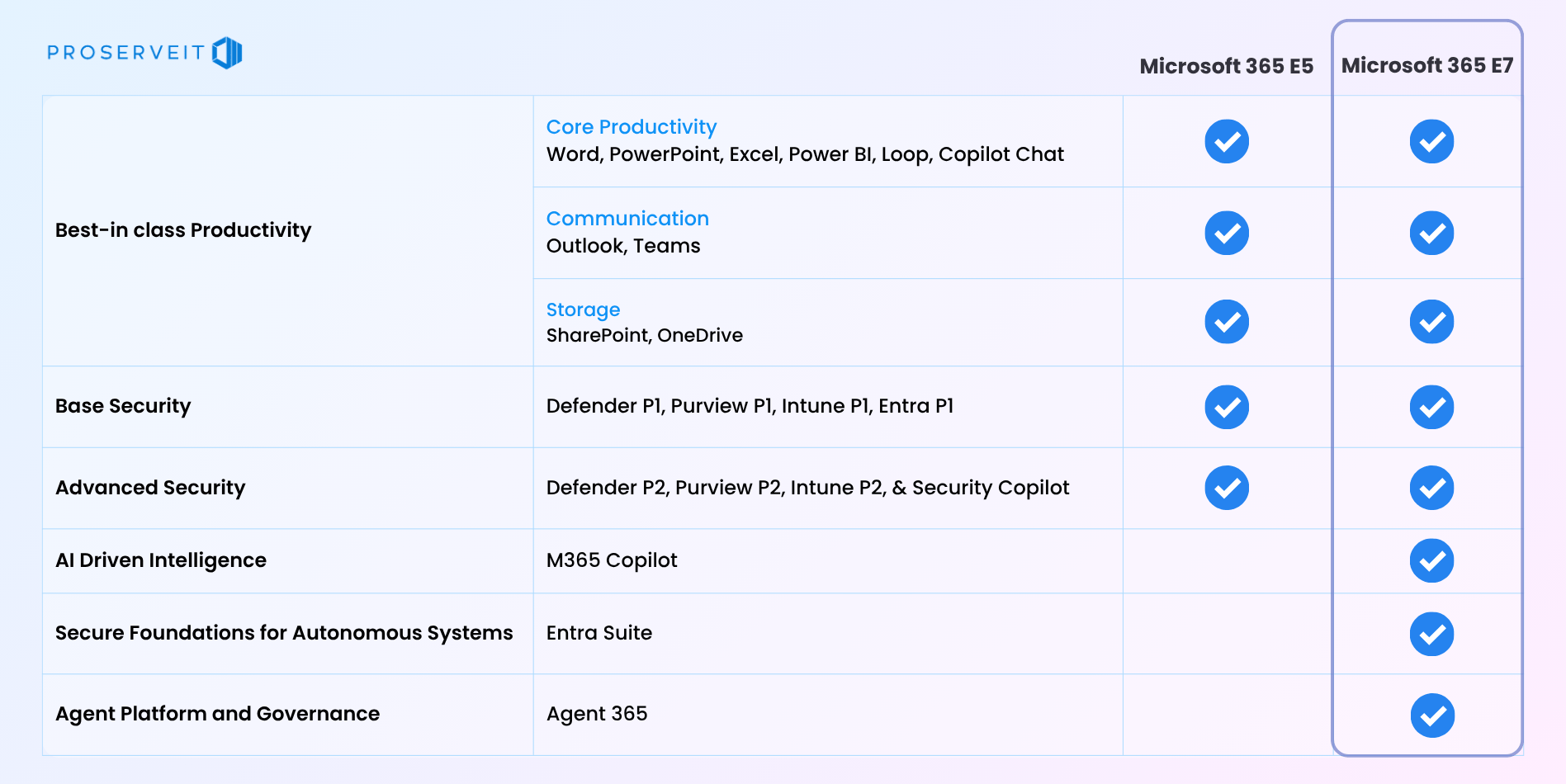
Rather than asking organizations to bolt AI on top of an existing environment, Microsoft 365 E7 brings Microsoft 365 E5, Copilot, Agent 365, and advanced identity controls through Entra Suite together in a single offering designed for organizations ready to operate AI more intentionally.
It was also clear during the discussion that E7 isn't an automatic next step for everyone. It's aimed at organizations actively moving beyond AI experimentation and starting to think seriously about governance, access, and long-term control.
👉 For the full breakdown of what's included in Microsoft 365 E7, pricing, and how it compares to E5 in detail, see our companion guide: Microsoft 365 E7 Explained: What It Is, What’s Included, Pricing
E7 vs. E5: Is the Upgrade Right for You?
At its simplest: Microsoft 365 E7 = E5 + Copilot + Entra Suite + Agent 365.
That single line is why so many organizations are asking whether an upgrade from E5 makes sense.
The answer, as both Jaime and Simone emphasized, depends far less on features and far more on where you are in your AI journey. E5 remains the foundation and continues to be a strong option. E7 isn't a replacement for E5, it's designed for a different stage of adoption.
When E7 starts to make sense
As Simone explained during the session, E7 tends to be a good fit if:
-
You’re already on E5 and planning to scale Copilot across more users or departments
-
You need advanced identity and access governance, not just for people, but for AI agents as well
-
You want one integrated license instead of managing multiple AI and security add‑ons
-
You’re actively moving beyond AI pilots and thinking about long‑term control, visibility, and accountability as AI executes real work
In other words, E7 aligns best with organizations that are starting to operate AI at scale, not just testing it.
When E5 (or other options) still make sense
If E7 feels like too big of a leap right now, you have strong alternatives:
-
Microsoft 365 E5 continues to provide a strong foundation for productivity, security, and compliance
-
Organizations under 300 employees on Business Basic, Standard, or Premium can also consider Microsoft’s recently released Copilot Business Bundles: a more accessible entry point to Copilot adoption
💡 Worth knowing: The Copilot Business Bundles include promotions of up to 35% off until June 30, 2026, making them a practical option for smaller teams ready to start with Copilot without committing to E7-level scope.
Simone also shared a helpful reminder for anyone thinking about making changes:
That advice reinforced a broader theme from the session: licensing decisions should align with where your organization is now and where it’s realistically headed next.
Highlights from the Live Q&A
Once the walkthrough wrapped up, the live Q&A quickly turned practical.
The questions reflected where many organizations are today: curious, cautious, and trying to understand how these changes translate into real‑world decisions. A few clear themes stood out.
How Are Organizations Actually Using AI Agents?
Attendees asked about realistic use cases for AI agents and how they differ from “regular” Copilot use.
As Jaime explained, many organizations are starting small, using built-in agents for things like research, summarization, or prompt coaching, before moving into more custom or workflow-specific agents.
The emphasis was on progression, not perfection: learn how agents behave, understand the outputs, and expand from there.
Copilot was framed as the central place where AI work begins, with agents stepping in as focused helpers that handle specific jobs or workflows.
What security questions should IT and compliance teams consider?
Jaime addressed this head-on: your data in Copilot is your data. Microsoft has been transparent that it does not use your corporate data to train models or for advertising. The green shield icon in Copilot confirms you're in your protected corporate instance.
He also flagged two areas worth reviewing:
-
Over-provisioned users: people with more access than their role requires
-
Content in overly accessible locations: like legacy folders buried deep in SharePoint that no one remembers existing
These aren't new risks, but AI makes it easier to surface content that was previously hidden, which means it's a good time to tighten things up.
His biggest security concern? Employees using personal, ungoverned AI tools like free or personal copies of ChatGPT or Claude, which are set to feed the model by default.
Giving your team an enterprise tool like Copilot is the best way to keep corporate data within your governance standards.
Watch the Full Webinar Recording
Want to see the walkthroughs, demos, and the entire discussion and Q&A?
Click below to access the full on‑demand session.
Next Steps and How ProServeIT Can Help
At ProServeIT, we’ve been supporting organizations at every stage of their AI journey, whether that’s rolling out Copilot for the first time, learning from early adoption, or figuring out where to go next with the latest updates like Copilot Wave 3 and Microsoft 365 E7.
Our approach has always been the same: meet organizations where they are, guide them based on what genuinely makes sense for their environment, and do so with a spirit of unreasonable hospitality. One that considers not just the technology, but the people and processes experiencing the change.
Whether you’re exploring E7, trying to make sense of agents, or simply charting a thoughtful path forward with AI, here are a few ways we can help continue the conversation.
👥 Microsoft Licensing Consultation
Microsoft licensing can get complicated... especially as Copilot, AI agents, and new bundles like E7 enter the picture.
Whether you’re evaluating Microsoft 365 E7 or reviewing your broader Microsoft licensing environment, meet with our licensing specialist, Simone, to identify optimization and cost‑saving opportunities, get support with upcoming renewals, and ensure your licensing aligns with how your organization actually works.
🤖 AI Agents & Agent 365 Executive Advisory
Looking to explore or scale AI agents? This discussion is for you.
Ask Jaime any questions you have on how Agent 365 enables secure governance, control, and operational maturity as agent‑driven work expands, including how it fits within Microsoft 365 E7.
💼 Private AI Executive Briefing Session
This is one of our most popular offerings: a complimentary tailored session (valued at $2,500) for your leadership team focused on aligning AI initiatives with real business priorities.
Facilitated by our executive team, this private briefing helps organizations identify where AI can create real business value today, and how to thoughtfully take it further. No jargon. No pressure. Just a practical conversation about what’s possible, what’s realistic, and where ROI may (or may not) exist.
Let Us Know How We Can Help
AI Agents, Licensing, or E7. Just say the word and we'll handle the rest.
.png?width=1102&height=675&name=E7%20vs.%20E5%20-%20Is%20the%20upgrade%20right%20for%20you%20(6).png)
Frequently Asked Questions (FAQS)

Kaavya is a creative enthusiast at ProServeIT, with a passion for writing, designing, and storytelling. As a marketer with a strong foundation in copywriting, she brings a unique blend of creativity and strategic insight to her role, helping to craft compelling content that aligns with ProServeIT’s mission.

Comments